RA bill calculator: measurement book in, net payable out
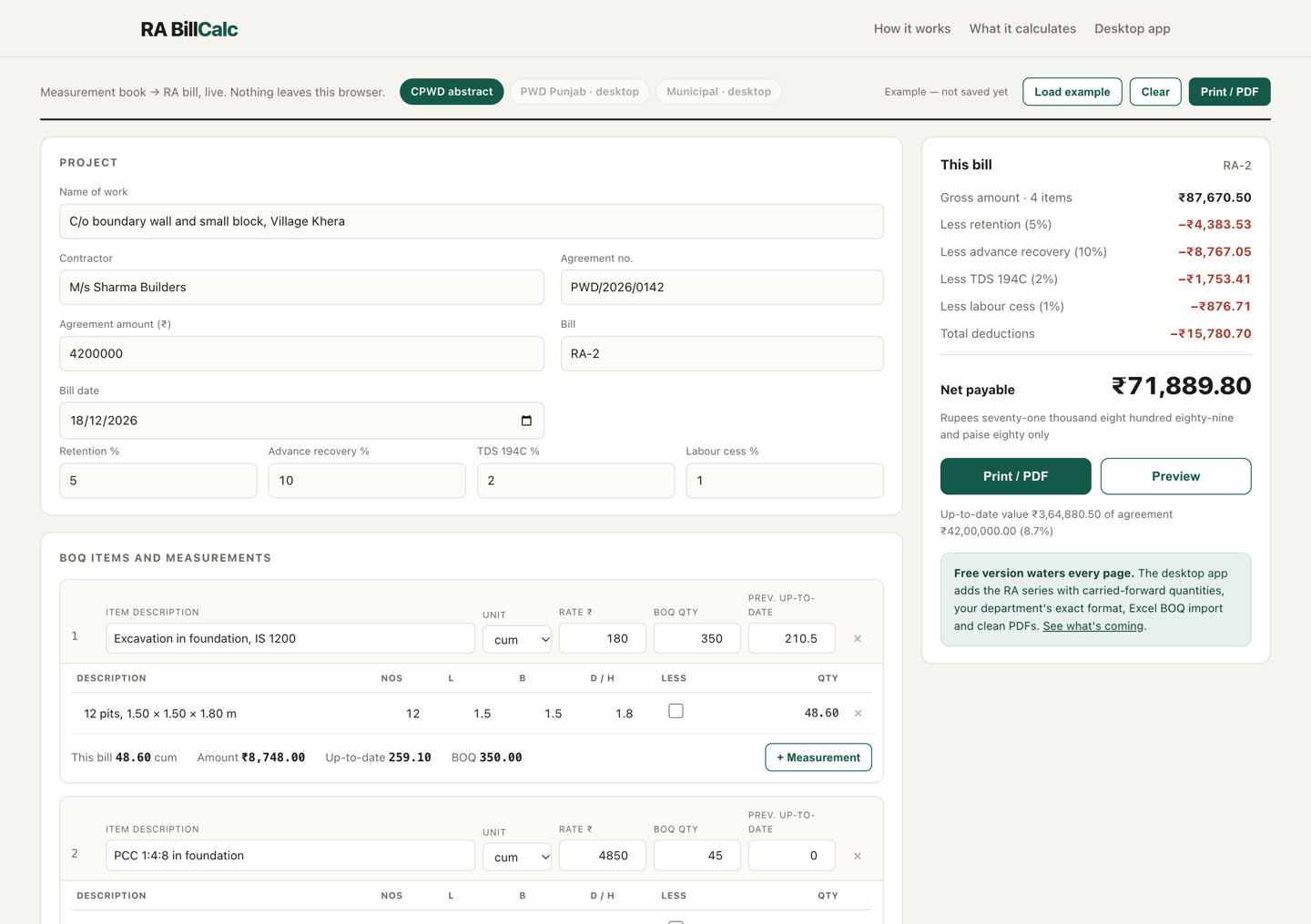
Type the measurement lines the way the JE writes them — Nos × L × B × D, with openings deducted — and get the running account bill abstract: gross, retention, advance recovery, TDS 194C, labour cess, net payable and the amount in words.
Nothing is uploaded. Free version watermarks the printed bill.
Three steps, no spreadsheet
Most contractors rebuild this in Excel every month, then fix the totals by hand. This does the same arithmetic instantly, including the part everyone gets wrong: deducting the openings.
Set the work and the rules
Work name, agreement number, contractor, agreement amount. Then the deduction percentages your agreement uses — 5% retention, 10% advance recovery, 2% TDS, 1% cess by default.
Enter measurements, not formulas
One line per measurement: Nos, L, B, D. Tick Less for door and window openings. Quantities and amounts update as you type, and the up-to-date quantity is shown against the BOQ.
Print the abstract
Part A work done, Part B deductions, Part C net payable, amount in words, signature blocks. Print to PDF from the browser — no formatting to fix afterwards.
What it calculates, exactly
No hidden rounding and no magic. These are the rules the calculator applies to every line.
Quantities
- Measurement line
- Nos × L × B × D
- Deduct line
- subtracted from the item
- Item quantity
- 2 decimals
- Amount
- qty × rate to paisa
- Up-to-date
- previous + this bill
- BOQ check
- warns on overrun
Money
- Gross
- Σ item amounts
- Retention
- % of gross
- Advance recovery
- % of gross
- TDS 194C
- % of gross
- Labour cess
- % of gross
- Net payable
- gross − deductions
- In words
- lakh / crore format
Free now, a proper billing desk later
The web calculator is deliberately limited to one bill. The desktop app is for contractors who bill the same work every month.
Web calculator
₹0, no signup, no account
- Measurement lines with deducts
- All four deductions and amount in words
- Printable CPWD-style abstract
- Overrun warning against the BOQ
- Saved in your browser, works offline
- Watermark on every printed page
- One bill at a time, no carry-forward
- No Excel import or export
RA Bill Desk
One-time licence per office · price announced at launch
- RA-1, RA-2 onwards with quantities carried forward
- CPWD, PWD Punjab and municipal formats
- Excel BOQ import, clean unwatermarked PDFs
- Measurement book register and bill history
- Materials-at-site and labour registers
- Offline licence, no cloud account, no subscription
Built for Windows first, then macOS. If you bill for a department whose format differs, tell us — formats are the reason people still use paper.
Common questions
Is the RA bill calculator really free?
Yes. Every calculation, deduction and the printable abstract is free with no signup. The only catch is a watermark on the printed bill. The desktop app removes it and adds the RA series, departmental formats and Excel import.
Does it store my bill on a server?
No. Everything stays in your browser storage on your own device. There is no login, no database and nothing uploaded, so client names, rates and measurements never leave your computer.
How are quantities and amounts rounded?
Each measurement line is Nos × L × B × D, deducted lines are subtracted, and the item quantity is rounded to two decimals. The amount is quantity × rate rounded to the paisa, half up. Deductions are computed on the gross amount and totalled the same way.
Which department formats does it support?
The free calculator prints a CPWD-style abstract with Part A work done, Part B deductions and Part C net payable. PWD Punjab and municipal formats, with carried-forward quantities across RA-1, RA-2 and later bills, are part of the desktop app.
Does it handle GST on works contracts?
No. It computes retention, mobilisation advance recovery, TDS under section 194C and labour cess, which is what the bill abstract normally needs. GST treatment for works contracts depends on your registration and contract type, so confirm it with your accountant before filing.